AppLovin: Setting Up for Success & Creative Best Practices
AppLovin is not necessarily a ‘plug-and-play solution’; it requires careful setup and ongoing monitoring to truly drive results. Read how to set yourself up for success.
Share this Blog :
TL;DR:
Setting up for success
Billable models
Preventing cannibalization
Building for outcomes
Creative best practice
FAQ
This is the final blog in our Applovin series. You can find the two previous pieces here:
“There are plenty of considerations before setting up campaigns. AppLovin is not necessarily a ‘plug-and-play solution’; it requires careful setup and ongoing monitoring to truly drive results.”
Set up measurement through your MMP or install the pixel. Purchases are optimized on a click basis, and the pixel can be implemented through Shopify or Google Tag Manager
Define targets and budgets, then decide campaign objectives and select the campaign type (CPP/ROAS), then add budget.
Track performance and optimize
Setting Up for Success with Applovin
1. Choosing Billing Models
dCPI billing
Dynamic billing tied to CPI
Recommended for top-of-funnel campaigns aiming to drive installs
Establishes baseline performance
cDPM billing
Tighter control of budgets
Enables stronger AXON optimization for ROAS and CPA
Used once a baseline is established to scale performance
2. Build for Outcomes with Machine Learning:
Consider what outcomes you are building the system for, for example:
ROAS – maximize revenue value
CPE – in-app events maximized for volume
CPI – maximize for installs
Choosing the outcome influences the setup and is worth careful consideration from the start.
Top Tip: Preventing Cannibalization – Cannibalization can manifest in factors such as campaigns bidding against each other, overlapping audiences that cause attribution issues, or cross-platform competition. Be aware that there may be overlap between AppLovin and other DSPs bidding on the same inventory, and ensure protocols are in place to identify and prevent it.
3. Creative and Ad Formats
Creative is an area that requires significant effort and planning. AppLovin creative formats offer unskippable, full-screen vertical video ads as competitive levers, and here are several different ad formats to consider to grow your strategy; our recommendation is the following system:
Win with Video: a primary growth driver
The most effective format available
Prioritize portrait orientation with subtitles
Provides strong reach and engagement for scalable performance
Scale with Playables: a performance multiplier
Potential to deliver high CVR.
More expensive CPM, but offset by efficiency
Use as standalone units or combine video and playable for the most effective results
Extend with Banners: incremental reach
Be selective; this format can be inefficient
Potential to unlock additional inventory and reach
Use when video and playable formats are saturated and incremental scale is needed
Top Tip: Segregate campaigns with banners from those with video and playables; banners offer extended reach but can be less scalable than video and playables, which are effective for prospecting.
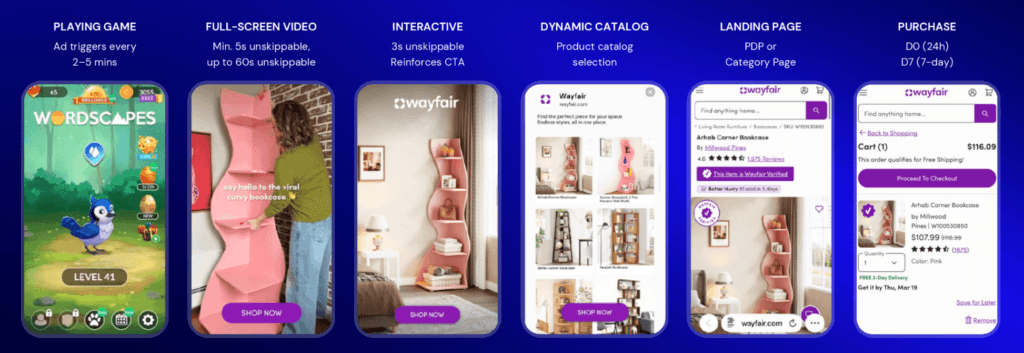
“AppLovin Ads primarily delivers full-screen video ads that users cannot scroll past. Roughly half of impressions occur between game levels, and the other half are rewarded video placements where users choose to watch an ad in exchange for in-game rewards. These ads are viewed with full attention. Average watch time is over 35 seconds, and viewability is guaranteed. AppLovin operates in an attention-rich environment. These ads are intentionally viewed, watched for extended periods of time, and give advertisers the ability to deliver a complete brand message with certainty that it will be seen.”
AppLovin relies on a continuous, weekly creative refresh to sustain performance. Unlike other systems, the inventory is concentrated, leading to greater creative fatigue. The system tests creative and scales best performers, rather than pausing creative test versions, e.g., long vs. short, UGC vs. product explainers. To really drive value, advertisers must be set up for ongoing, weekly updates to creative iteration aligned with a robust testing plan.
According to AppLovin, the average user sees 8 different ads across 10 impressions before making their first purchase. This means every creative plays a role, from upper-funnel brand awareness to lower-funnel conversion. Creatives, therefore, have to cover the full purchase journey, and this means advertisers need creative scale to succeed.
Image caption: Ad formats are built to capture attention
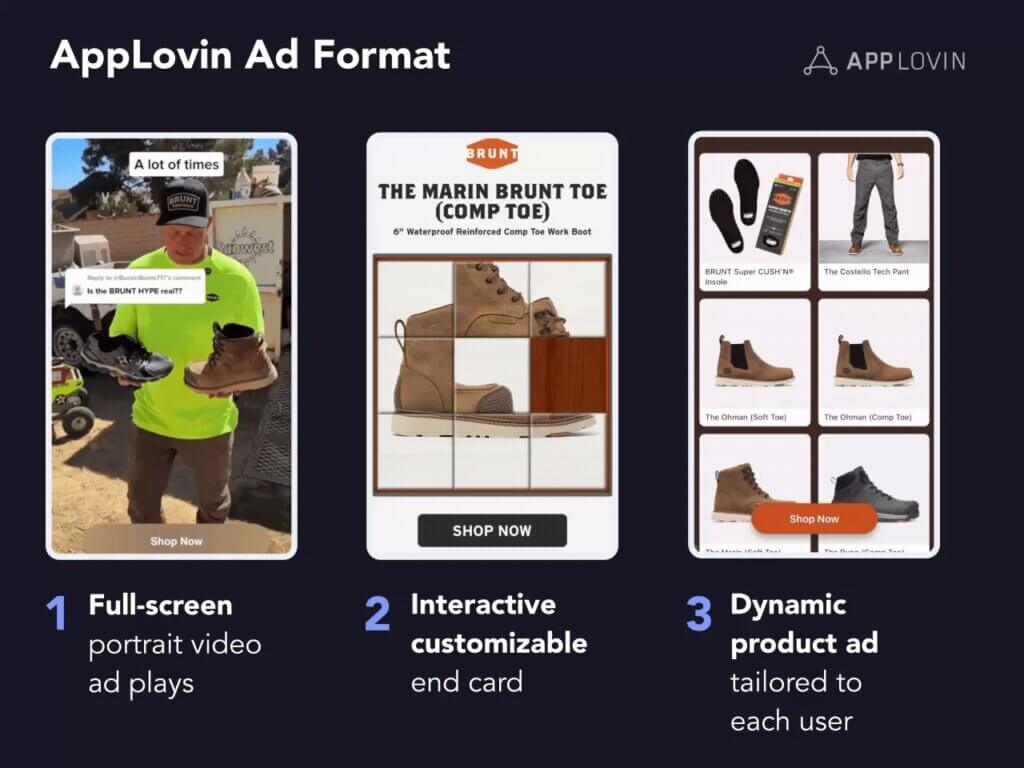
Image caption: Dynamic Product Ads are a new ad format that shows an assortment of products personalized to each user. Dynamic Product Ads (DPAs) have been seen to increase performance by 25% on average. Find out more.
Benchmark: Leading gaming apps deploy a minimum of between 30 and 35 creatives per week and 10 to 15 playables.
“Advertisers often ask for a fixed set of best practices: exact campaign structures, precise creative formulas. AppLovin Ads is still new for web brands. There is no single template that guarantees success. That creates opportunity. Nimble advertisers generate outsized results by testing targeting and creative strategies aggressively. The most successful brands treat AppLovin as an environment to experiment, iterate, and discover incremental growth. We get excited when we see marketers bring their own expertise and innovate on the platform.”
Adam Foroughi, CEO, AppLovin
Top Tip: Creative refresh rate should be tied to the spend and scale of campaigns.
How to win with creative
Build a high-velocity creative studio
Start with a clear Test>Learn>Iterate framework
Scale the creative that wins; replace losing creative quickly
Include clear captions and highlight key product benefit keywords
Ensure there are storytelling videos that are 30 seconds or longer
Include real people; 1st-party storytelling helps build trust
Test promotions and urgency messaging
Include core product benefits and USP, as well as social proof such as product reviews
Use high-quality images
End cards can be reused across multiple creative sets
Video specs
9:16 portrait ratio
MP4/MOV/MaV file type
1GB max file size
60-second max duration
Add up to 10 videos per creative set
Interactive Specs
JPG/PNG/GIF format
9:16 portrait ratio
CTAs will be auto-overlaid; there is no need to add to the creative asset
Avoid text or images at the bottom of the asset, as this will be covered by the automated CTA
One of the biggest challenges is creative deployment, so ensuring creative can be produced at scale before initial testing starts is important for achieving real success.
Frequently Asked Questions
Up to 10 assets per campaign set, though a smaller number, i.e., between 1 and 4, can enable testing to begin.
Our recommendation is to plan for a weekly creative refresh.